
Content
Your VPS is protected by a firewall that controls network traffic. If you want to connect via SSH, run a website, or allow access to a specific service, you need to add firewall rules.
Access the firewall interface
- Log in to your Client Account at my.host-age.ro.
- Select the desired VPS.
- Go to the Network > Firewall section.
- Click Add new rule. A window will open as shown in the image below.
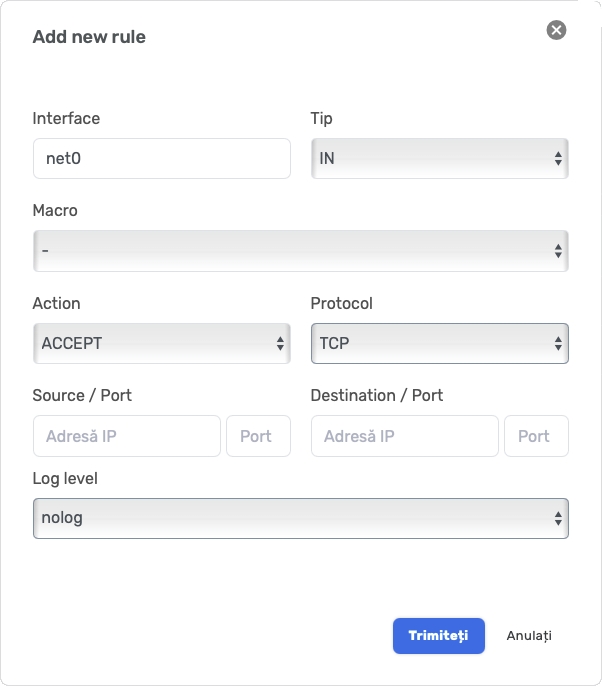
Explanation of the fields in the configuration window
- Interface: usually
net0– the main network interface of the VPS (do not change). - Direction:
IN→ traffic entering the VPS (rules are usually added here).OUT→ traffic leaving the VPS (normally left open).
- Macro: predefined shortcuts (e.g. HTTP, HTTPS, SSH). If you want to manually choose the ports, leave it as
-. - Action:
ACCEPT→ allow traffic;DROP→ block traffic. - Protocol:
TCPorUDP, depending on the application. - Source / Port: the IP address and port from which the traffic originates (you can leave empty to allow access from anywhere).
- Destination / Port: the VPS IP and port you want to open (e.g. port 22 for SSH).
- Log level:
nolog– rules are not logged (can be left as is).
Examples of useful rules
SSH Access (server administration)
- Direction: IN
- Action: ACCEPT
- Protocol: TCP
- Destination / Port:
22 - Then click Submit.
HTTP Access (websites)
- Direction: IN
- Action: ACCEPT
- Protocol: TCP
- Destination / Port:
80
HTTPS Access (secure websites)
- Direction: IN
- Action: ACCEPT
- Protocol: TCP
- Destination / Port:
443
Other services (examples)
- FTP: TCP port 21
- Mail (SMTP): TCP port 25 (note: many providers block outbound traffic on port 25 to prevent spam).
- MySQL: TCP port 3306
Rules for updates and package installation
For the operating system to update and download packages:
- Outbound (OUT) traffic must be allowed on the following ports:
- 53 (TCP/UDP) – DNS
- 80 (TCP) – HTTP
- 443 (TCP) – HTTPS
Usually the OUT firewall is allowed by default, but if it is blocked these rules need to be added as well.
Security recommendations
- Allow SSH (22) only from your fixed IP, if possible (in the Source IP field).
- Do not open more ports than necessary.
- Always test using:
nc -zv IP_ADDRESS PORTor from a browser (for ports 80/443).